
DEMO
Latest Wordspress.org News
2.9 Release Candidate 1
We’re at that exciting point in WordPress development where the dev team feels like version 2.9 is complete and ready for the world. If you’ve been waiting for your moment to pitch in, it’s now. First we need tech savvy testers to upgrade their blogs and kick the tires, make sure everything is rolling like […]
Core Team Meetup Results
To get started, here’s a short video from the meetup discussing some of the topics and 2.9. In the opening pan, you’ll see (L-R) Andrew Ozz, Mark Jaquith, Jane Wells, Peter Westwood, and Ryan Boren, followed by Matt Mullenweg as the first person talking. Tip: go full-screen in HD to feel like you were there. […]
Canonical Plugins (Say What?)
There have been a lot of references to “canonical plugins” over the past year, especially at WordCamps by Matt, but we haven’t really posted anything official about the idea, nor have we really made much progress beyond discussions about how awesome it would be to have canonical plugins and how good it would be for […]
A Brief Intermission
Just a heads up that Trac commits will be pretty low over the next couple of days, as all the core committers are in Orlando: Matt, Ryan, Andrew, Peter and Mark. We all came for WordCamp Orlando (fun!) and are staying a couple of extra days to discuss the vision for WordPress in the coming […]
Pagination
Paginate in case of huge items number
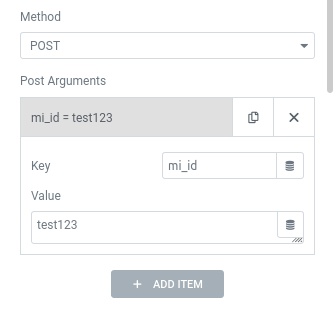
POST Request
Send Post payload data on your request call
WordPress Rest API
Full support to native API
ElasticSearch
Full support to Elastic API to read Documents
Query Rest API
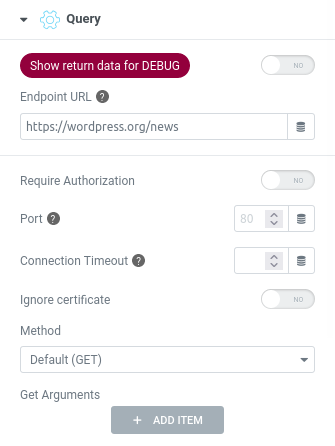
EndPoint URL
The remote url of API service
Require Authorization
Optional User and Password or Token access for private area
Port
Set if different from default 80
Connection Timeout
Sometimes the service could be longer than standard timeout
Ignore certificate
Enable it if remote service is not on ssl
Method
Many ways to manage request data and manipulate the response, some generics like standard GET and POST and more specific for WORDPRESS and ELASTICSEARCH
Parameters
GET & POST extra arguments
If you need to pass more data into your request, like authentication info, filter values, etc, you can add them defining for each one its own key accepted by the service and its value, maybe loaded via Dynamic Tag

WordPress Native API REST
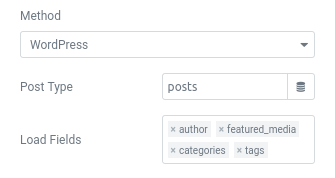
Post Type
Set here the name of your CPT or leave default posts visualization.
Also different object types are supported, like “users”, “categories” and so on
Load Fields
By default you get only the ID of related post objects, like:

- Author
- Feature Media
- Categories
- Tags
Enable them to get full data of those object.
WARNING: this will increase load time, because each object require an extra request to WP remote service

Elastic Search
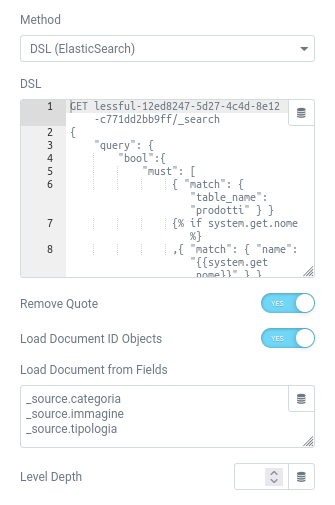
DSL
You can write your custom Query DSL (optionally dynamic with Twig), copy it from Kibana and execute here
Remove Quote
Optional, clean _source data from extra quotes added by elastic response

Load Document ID Object from Fields
Enable it to retrieve full data of main fields referenced only by Document ID.

Specify all fields, once per line, you want to fill with full data. Separate sub keys with a dot.
Level Depth
Maybe you need to expand fields of loaded documents nested on main document, so define how many iteration recursion you want to execute

WARNING: this will increase load time, because each Document require an extra request to Elastic remote service
Archive Rows
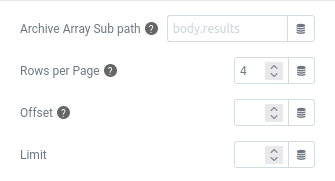
Archive Array Sub path
Set here optionally the index of sub array into the JSON result, separate each level with a dot
Rows per Page
Define how many result per page, necessary if activate the Pagination
Offset/Limit
Optional to modify the results display number
Cache
You can optimize page load with Enable Cache which will be valid for a defined amount of time until it will be refreshed.
Rest API Fields
We wanted to create a way to visualize, sort, and manage every type of data into the spreadsheet to generate complete lists in all its parts.
Display elements
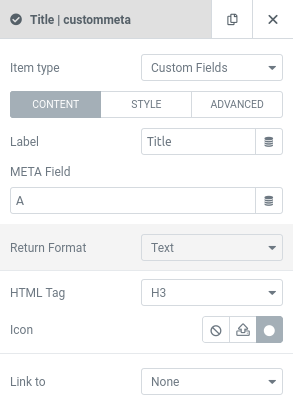
- Custom Field, a column field
- Static (text, image, icon, code)
- Loop Index
- A custom Elementor Template
Each type of element is customizable in all its parts with dedicated parameters in order to achieve maximum control.
Style
All configurations for the style are accessible immediately while creating the items.
Advanced
As if that wasn’t enough, some advanced parameters let you refine the visualization and its behavior.
Query Rest API
SKINS
Several display styles are available for all e-Query widgets that will allow you to get the navigation approach you want.
e-Developer